WARNING:
engineering defect in stock Intel heatsink/fan units
for LGA socket (“Land Grid Array”) CPUs
(This generic message only applies to
Intel CPUs compatible with LGA sockets and
Intel heatsink/fan units with “push-pin” fasteners.)
The problems with high CPU temperatures
are most probably the result of improper seating
of the stock Intel heatsink/fan unit ("HSF").
That heatsink and fan do dissipate heat quite
adequately, as long as the HSF maintains
enough contact pressure with the top of the
CPU chip, also known as the “heat spreader.”
However ...
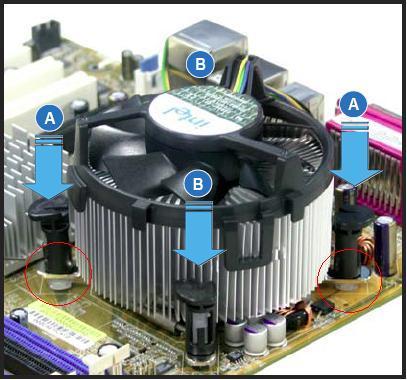
the 4 pronged fasteners (“push pins”) are not gripping properly,
and this results in less contact pressure with the
top of the CPU chip: less contact
pressure
translates directly into higher CPU temps.
Also, the push pins are made of a material
that appears to be "creeping" after many cycles
of heat and cold, which further reduces the
contact pressure with the top of the CPU chip.
A short-term solution is to unlock and re-lock each
push pin, while pressing down with your thumb
on the fan housing directly above each push pin.
Doing this one thing reduced our CPU temp from
140 F. to 100 F., which helped isolate the problem.
Best solution is to switch to a superior HSF
with a proper backing plate. We prefer the
ASUS VR Guard Series, because of its
superior
engineering for cooling the voltage regulators
on recent high-end ASUS LGA-775 motherboards.
[And, after this WARNING was first written,
a number of superior HSFs have become available
which incorporate proper backing plates and also
machine screw fasteners with integrated springs.]
Here are two links to a company which sells two products
called LGA775 Bolt-Thru-Kit with Screws &
Springs and
Nehalem Socket B / LGA 1366 / Bolt-Thru-Kit with
Screws & Springs:
http://www.sidewindercomputers.com/lgbowiscsp.html
http://www.sidewindercomputers.com/lga13sobbowi.html
Sidewinder is now stocking HSFs for the LGA1156 socket:
http://www.sidewindercomputers.com/prinso11adki.html
http://www.sidewindercomputers.com/prmedso77111.html
[We are not actively marketing Sidewinder’s computer products:
we have installed several LGA775
bolt-thru-kits, and we highly
recommend contact Gary Stofer for his consistent professionalism.]
Other vendors are catching on (finally);
for example Xigmatek
now offer these two retention brackets:
http://www.newegg.com/Product/Product.aspx?Item=N82E16835233027
http://www.xigmatek.com/product/accessory-crossbow-ack-i5361.php
Noctua now offers a universal retention bracket for 3 different LGA sockets:
http://www.newegg.com/Product/Product.aspx?Item=N82E16835608015
http://www.noctua.at/main.php?show=productview&products_id=30&lng=en
So does Cooler Master’s Hyper 212 Plus:
http://www.coolermaster-usa.com/product.php?product_id=2923
http://www.newegg.com/Product/Product.aspx?Item=N82E16835103065
These next photos show evidence of improper seating
on a recent ASUS motherboard with stock Intel HSF:
http://www.supremelaw.org/systems/heatsinks/
http://www.supremelaw.org/systems/heatsinks/Intel%20Stock.2.jpg

The chrome foot inside the red circle on the left
is raised up about 1mm higher than the chrome foot
inside the red
circle on the right.
Also, Intel's Thermal Interface Material ("TIM")
is too thick from the factory, which also results
in improper seating i.e. all 4 push pins
do not "lock" properly, even when applying a
lot of downward pressure on each one.
This TIM should be removed and replaced with
a razor-thin layer of Arctic Silver (or comparable
thermal paste) -- NO OOZING PLEASE!!
I hope this helps.
p.s. If you
purchased your computer from a company
that uses Return Merchandise Authorizations
("RMA"),
you should start a new RMA so that this defect and
solution
are reported formally to your supplier.
Sincerely yours,
/s/ Paul A. Mitchell, Inventor and
Systems Development Consultant
Email: mrfsys@gmail.com
p.s. Prior efforts to isolate this problem are documented
here: